

 Home
Home


For further details, please contact us.
Contact Us
Ask ten flexo printers how many printing units their next press should have, and you will get ten different answers. The truth is, there is no single right number—only the number that fits your substrate mix, your color requirements, and your finishing needs.
To answer the question properly, you need to understand what a printing unit actually does, what configurations are available, and what factors should drive your decision.
What Is a Printing Unit?
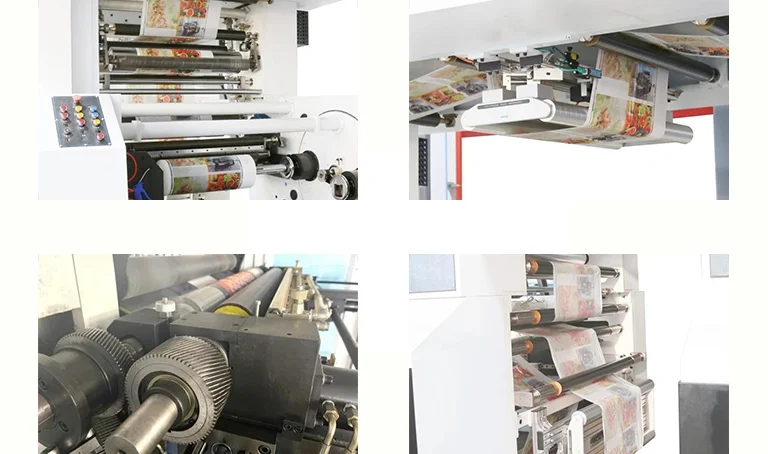
In flexographic printing, a printing unit—also called a color station or deck—is the modular assembly that transfers one specific ink color onto the substrate. Each unit contains four essential components: an anilox roll with engraved cells that meters a precise volume of ink, a plate cylinder that carries the photopolymer printing plate, an impression cylinder that presses the substrate against the plate, and an ink chamber or fountain system that delivers ink to the anilox roll. Every unit prints one color. A 6-color press prints six colors; an 8-color press prints eight.
The number of units you choose determines not just how many colors you can lay down, but how many inline processes—coatings, varnishes, foiling, laminating, even backside printing—you can run in a single pass.
The Range: From 2 to 12 and Beyond
Flexo presses are available with anywhere from 2 to 12 printing units, and sometimes more. A basic 2-color or 4-color press might serve a shop printing simple corrugated boxes or monochrome bags. A 6-color press sits in the middle of the equipment spectrum—more capable than a 4-color narrow-web unit but less specialized than an 8- or 10-color central-impression (CI) drum configuration.
At the high end, leading manufacturers offer presses with 8 or 10 printing units as standard, with optional configurations reaching 12. High-end CI flexo presses can be configured with 8 or 10 printing units, while state-of-the-art in-line systems support up to 12 print units.
But why would anyone need 10 or 12 units? The answer lies in what modern packaging demands.
The Four Factors That Determine Your Unit Count
1. Color Complexity
The most obvious factor is color. A typical CMYK process job needs four units: cyan, magenta, yellow, and black. But CMYK alone often falls short. Process colors can produce muted or inaccurate solid brand colors. That is why flexo printers routinely break out brand-specific Pantone Matching System (PMS) colors to their own dedicated decks and print them as solids.
A job with CMYK plus two spot colors needs six units. Add an opaque white for printing on clear film—a common requirement in flexible packaging—and you are at seven. Add a varnish or coating, and you are at eight. This is why 8-color and 10-color configurations have become the norm in label and packaging printing.
Extended gamut printing——using CMYK plus orange, green, and violet (CMYKOGV)——requires at least seven units and delivers a significantly wider color gamut without resorting to spot colors.
2. Substrate and Press Configuration
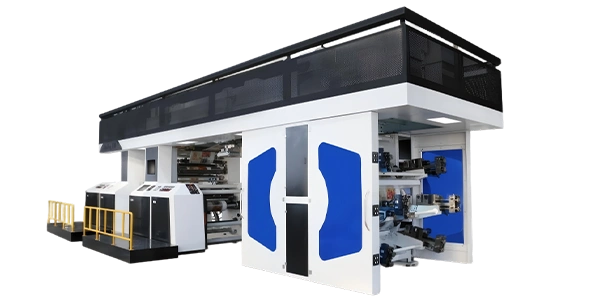
The type of substrate you print on influences not just how many units you need, but what press configuration you should choose. For a detailed comparison of available configurations, explore our flexo printing machine product series.
Central Impression (CI) presses arrange all printing units radially around a large-diameter common impression cylinder. The substrate wraps around this cylinder as it passes each station, which means the web is supported at every point where ink is being transferred. This architecture delivers superior registration stability, especially on extensible substrates like thin films and foils. CI presses are the preferred choice for flexible packaging applications. Leading CI presses typically offer 8 to 10 units.
Stack presses mount printing units vertically, one above the other. This configuration saves floor space and is popular for corrugated, paper bag, and board printing. However, stack presses subject the web to cumulative tension as it travels upward through multiple nips—thin films can stretch, and delicate papers can wrinkle under this tension. Stack presses are available from 2 to 10 colors.
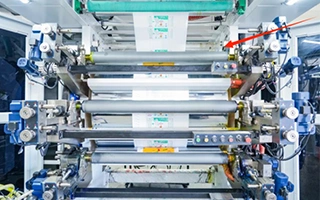
In-line presses place units in a straight horizontal line. This layout is common in narrow-web label printing and allows easy integration of finishing processes like die-cutting, laminating, and slitting. In-line configurations are highly modular—many manufacturers now offer field-upgradable deck modules, meaning you can start with 6 decks and expand to 8, 10, or even 12 as your business grows.
3. Inline Finishing and Special Effects
Here is where the unit count can really climb. Additional printing units are not just for extra colors—they are for inline processes that would otherwise require a second pass or an offline finishing line.
With more units, you can add:
- a. Metallic inks
- b. UV spot coatings
- c. Matte or gloss varnishes
- d. Cold foil or hot foil stamping
- e. Adhesive applications
- f. Backside printing
All of these can be executed in one pass, reducing setup time, labor, and waste.
Consider a typical snack bag design: CMYK for imagery, two brand-specific spot colors, a cold foil underlay, and a matte varnish topcoat. That is at least 8 colors, requiring a multi-unit press. A wine label with gold embossing, textured varnishes, and intricate multicolor logos can demand even more.
4. Double-Sided Printing
Additional color units also enable printing on both sides of the substrate without flipping or refeeding the material. This is critical for food pouches with nutritional information on the back, promotional packaging with inner prints, or pharmaceutical labels with instructions on the reverse side.
A Practical Framework for Decision-Making
So how many units does your flexo press need? Here is a practical framework:
4 to 6 units — Suitable for basic CMYK process printing with one or two spot colors. Good for simple corrugated, folding cartons, and basic labels.
6 to 8 units — The sweet spot for most label and packaging converters. CMYK plus spot colors, opaque white, and a varnish or coating. This range covers the majority of commercial work.
8 to 10 units — Extended gamut printing (CMYKOGV), complex spot-color work, cold foil, multiple coatings, and backside printing. Increasingly the standard for high-end packaging and prime labels.
10 to 12 units — Advanced specialty applications: security printing, luxury packaging, multi-web constructions, booklet labels, and complex adhesive deadening constructions.
Future-Proofing Your Investment
One of the smartest trends in modern flexo press design is modularity. Manufacturers now offer field-upgradable deck modules—you can start with a 6-unit configuration and expand to 8, 10, or 12 as your business grows and your job mix becomes more complex. This approach lets you match your initial investment to your current needs while preserving the option to scale up without replacing the entire press.
The Bottom Line
There is no universal answer to how many printing units a flexo press needs. The right number depends on your color requirements, your substrate mix, your need for inline finishing, and your growth trajectory. A 4-color press might serve a corrugated box plant perfectly. A 10-color CI press might be essential for a flexible packaging converter running high-end film work. And a 12-color in-line press might be the only way to produce complex multi-layer labels in a single pass.
What matters is not chasing the highest number, but matching the configuration to your actual production reality—and choosing a press platform that gives you the flexibility to add units as your needs evolve.
Every printing operation is unique. That is why the best approach is a fully customizable press configuration—from 4 to 12 printing units—available in stack, CI, and in-line designs. Modular architecture lets you start with the units you need today and expand seamlessly tomorrow. Whether you are printing corrugated, flexible film, labels, or folding cartons, the right press is one that delivers the right balance of capability, cost, and scalability for your specific business. For tailored recommendations based on your production profile, explore our flexo printing and converting solutions page.
To determine exactly how many printing units your flexo press needs, evaluate your current job mix, your substrate range, and your growth plans. Work with an experienced supplier who can guide you through the options and build a machine that grows with you—not one that forces you to over-invest today or limits you tomorrow. To understand how different press architectures affect your unit count options, read our detailed comparison on CI Flexo vs Stack Flexo.
Related Reading
-
CI Flexo vs Stack Flexo: Which Printing Machine Should You Choose?
-
Bridge-Type Flexo Printing Machine for Paper and Industrial Packaging
-
Key Flexo Printing Applications in Packaging & Labels
-
Inline Flexo Printing Machines for Label Production