

 Home
Home


For further details, please contact us.
Contact Us
You see the results of flexographic printing every day—the colorful snack bag in your pantry, the branded paper cup from your morning coffee, the shipping box delivered to your door, the label on your shampoo bottle. Yet most people have never heard of the technology that makes all of this possible.
Flexographic printing—commonly shortened to flexo—is one of the most widely used printing processes in the world, yet it remains largely invisible to the end consumer. For packaging professionals, converters, and production managers, understanding how a flexo printing machine works is essential to making informed equipment decisions. This guide explains what flexo printing is, how the process works step by step, and why it dominates the packaging industry.
What Is Flexographic Printing?
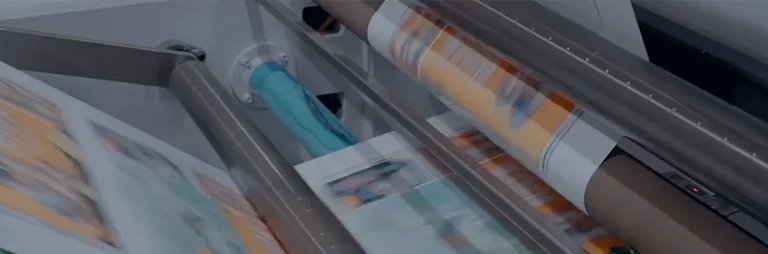
Flexographic printing is a form of rotary relief printing in which quick-drying inks are transferred from flexible printing plates to a substrate. The term "flexographic" comes from the flexible nature of the printing plate—typically made of rubber or photopolymer—which carries a raised, mirrored image of the design to be printed.
Think of it as a highly automated, industrial-scale rubber stamp. The raised areas of the flexible plate receive ink and transfer it directly onto the material passing through the press. Unlike offset printing, which transfers ink indirectly through a blanket cylinder, flexo is a direct printing method.
Key characteristics that define flexo printing:
-
Relief printing: The image areas are raised above the non-image areas on the plate
-
Flexible plates: Plates are made of rubber or photopolymer, capable of wrapping around cylinders
-
Direct contact: Ink transfers directly from the plate to the substrate
-
Rotary process: The press operates continuously with rotating cylinders
-
Wide substrate compatibility: Can print on paper, film, foil, corrugated board, nonwovens, and more
A Brief History of Flexo Printing
The first flexo printing press was built in 1890 in Liverpool, England, by the Bibby, Baron and Sons Company. At that time, the process was known as aniline printing because the inks contained dyes derived from aniline oil.
In the early 20th century, flexo was used for food packaging in the United States—until the FDA declared the inks unsafe for food contact. Safer inks were developed in the mid-1900s, and in 1952, the process was officially renamed flexographic printing (or "flexography").
Over the decades, significant improvements in inks, printing plates, and press technology have elevated flexo from a simple, low-quality process to a high-definition printing technology capable of rivaling offset and gravure in quality. Today, flexography continues to dominate printing technologies in the packaging industry. According to the Flexible Packaging Association's 2026 State of the Industry Report, flexography represents 76 percent of shipments in the U.S. flexible packaging market.
How a Flexo Printing Machine Works – Step by Step
A modern flexo printing machine operates in two main phases: prepress and printing.
Phase 1: Prepress – Preparation
Before any printing occurs, the job must be prepared:
-
Artwork creation: The design is created digitally
-
Plate making: The image is converted into a flexographic printing plate—typically made of photopolymer, a light-sensitive material that hardens when exposed to UV light. Modern "Computer-to-Plate" (CTP) technology allows plates to be created directly from digital files
-
Plate mounting: Plates are mounted onto printing cylinders or sleeves using plate mounting tape
-
Ink preparation: Inks are mixed and prepared for the press
Multiple plates are made—one for each color in the design.
Phase 2: Printing – The Press in Action
Once prepress is complete, the actual printing process begins. Here is what happens step by step inside a flexo printing machine:
Step 1: Substrate unwinding. The substrate (paper, film, foil, or other material) unwinds from a roll and feeds into the first printing station under closed-loop tension control.
Step 2: Ink pickup. The anilox roller—often called the "heart" of the flexo process—picks up ink from the doctor blade chamber. The anilox roller is engraved with microscopic cells that hold a precise, measured volume of ink.
Step 3: Ink metering. Doctor blades wipe excess ink from the surface of the anilox roller, leaving only the ink contained in the engraved cells. This ensures a thin, even, and consistent layer of ink is transferred to the printing plate.
Step 4: Ink transfer to plate. The anilox roller transfers the metered ink to the raised image areas of the flexible printing plate mounted on the plate cylinder.
Step 5: Image transfer to substrate. The substrate passes between the printing plate and the impression cylinder. The impression cylinder presses the substrate firmly against the plate with a "kiss impression"—just enough pressure to transfer the image without damaging the material.
Step 6: Drying. After each color is applied, the substrate passes through a drying system. For water-based inks, hot air evaporates the water; for UV inks, high-intensity lamps instantly cure (polymerize) the ink.
Step 7: Repeat for each color. The process repeats at each subsequent printing station—one station per color—until the full image is complete.
Step 8: Rewinding. The finished printed substrate is rewound into a roll. Some presses include optional slitting stations to cut the wide roll into multiple narrower rolls.
Key Components of a Flexo Printing Machine
Every flexo printing station contains several critical components that work together to produce the final print:
| Component | Function | Why It Matters |
|---|---|---|
| Anilox Roller | Engraved cylinder with microscopic cells that hold and transfer a precise volume of ink | Determines ink film thickness and color consistency; the "heart" of flexo quality control |
| Doctor Blade System | Removes excess ink from the anilox roller surface | Ensures consistent ink metering; prevents ink starvation or flooding |
| Plate Cylinder | Holds the flexible printing plate | Carries the image to be printed; plate accuracy directly affects print quality |
| Impression Cylinder | Presses the substrate against the printing plate | Provides the contact pressure needed for clean image transfer |
| Printing Plate | Flexible rubber or photopolymer with raised image areas | The image carrier; determines print resolution and detail |
| Drying/Curing System | Hot air or UV lamps that dry or cure the ink after each color | Prevents smudging and set-off; critical for ink adhesion |
| Ink Supply System | Delivers ink to the doctor blade chamber; controls flow, temperature, and viscosity | Maintains consistent ink properties throughout the run |
The Anilox Roller – The Heart of Flexo Quality
The anilox roller deserves special attention because it is the single most important component for print quality in flexography.
The surface of an anilox roller is engraved with a pattern of microscopic cells—typically millions per square inch. The size, depth, and density of these cells determine exactly how much ink is transferred to the printing plate. This is measured in Billions of Cubic Microns (BCMs): higher BCMs deliver more ink for solid areas and heavy coverage; lower BCMs deliver less ink for fine detail and halftones.
What this means for you: The anilox roller selection directly affects print quality. Choose the wrong anilox, and you'll get ink starvation (washed-out colors) or ink flooding (blurred details and dot gain).
Flexo Printing vs Other Printing Methods
To understand where flexo fits in the printing landscape, it helps to compare it with other major printing processes:
| Feature | Flexography | Offset Lithography | Gravure |
|---|---|---|---|
| Principle | Relief (raised image) | Planographic (flat image) | Intaglio (recessed image) |
| Image Transfer | Direct | Indirect (plate → blanket → substrate) | Direct |
| Plate Material | Flexible rubber/photopolymer | Aluminum | Rigid metal cylinder |
| Typical Resolution | Up to 180 LPI | 200–500 LPI | 5–600 LPI |
| Substrate Range | Extremely wide (paper, film, foil, board, nonwoven) | Primarily paper and board | Wide |
| Best For | Packaging, labels, flexible materials | Commercial printing, magazines, brochures | Long-run packaging |
| Cost Efficiency | Cost-effective for medium to long runs | Cost-effective for medium runs | Only cost-effective for very long runs |
| Environmental | Water-based and UV inks available | Solvent-based common | Solvent-based common |
Key takeaway: Flexo dominates the packaging value chain. While offset traditionally rules high-detail commercial graphics, flexo is the go-to choice for printing on the wide variety of materials used in packaging—from flexible films to corrugated board.
What Can a Flexo Printing Machine Print?
One of flexo's greatest strengths is its substrate versatility. Based on RaLoyal's product offerings, a flexo printing machine can print on virtually any type of material:
Flexible packaging films:
-
PE, BOPP, PET, PVC
-
Laminated materials
-
Metallic films and foil
Paper and paperboard:
-
Kraft paper and coated paper
-
Paper cups and paperboard
-
Burger wrappers
-
Thermal paper
-
Synthetic paper
Labels:
-
Self-adhesive labels
-
Stickers
-
High-grade self-adhesive labels
Other materials:
-
Nonwoven materials
-
Cellophane
-
Medical products
Common products you encounter daily that are printed with flexo:
-
Snack bags and cereal boxes
-
Frozen food pouches
-
Beverage labels
-
Disposable cups and containers
-
Shampoo and personal care labels
-
Retail shopping bags
-
Burger wrappers
Flexo Press Architectures
Different flexo press architectures are designed for different applications and substrates. Based on RaLoyal's product lines:
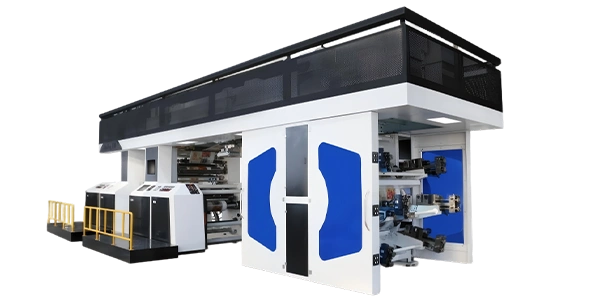
CI (Central Impression) Flexo Printing Machines
-
Key feature: Central impression drum design that eliminates material stretching
-
Performance: ±0.075mm registration accuracy at speeds up to 500m/min
-
Color options: 4-10 colors
-
Web widths: 850-1650mm
-
Best for: Films, foils, and flexible packaging
-
Key technologies: Full-servo drive with Heidenhain encoders, non-stop automatic roll change, closed-loop tension control, 5m energy-efficient oven
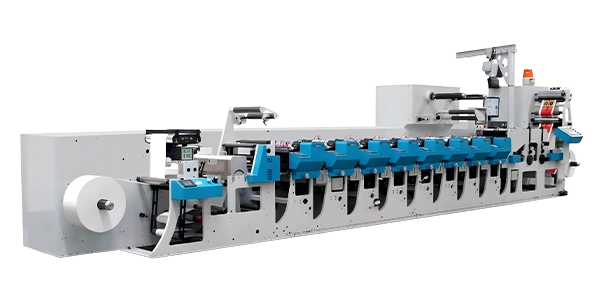
Inline Flexo Printing Machines
-
Key feature: Modular servo-driven unit presses with petal structure for quick roller change
-
Performance: ±0.1mm registration accuracy at speeds up to 180m/min
-
Color options: 4-12 colors
-
Web widths: 350-650mm
-
Best for: Labels, short runs, and quick changeover
-
Key technologies: 2 servos per printing unit, automatic pre-registration, inline die-cutting and slitting
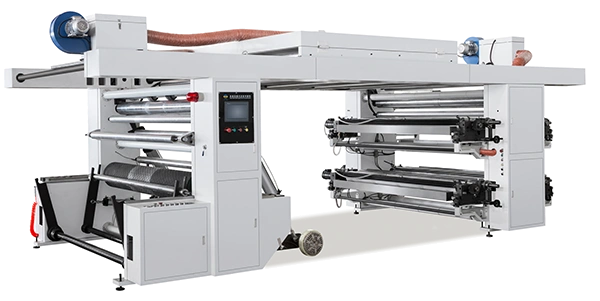
Bridge-Type Flexo Printing Machines
-
Key feature: Long drying path with enclosed doctor blade system
-
Performance: ±0.15mm registration accuracy at speeds up to 150m/min
-
Color options: 4-8 colors
-
Web widths: 1000-1600mm
-
Best for: Non-woven fabrics and kraft paper
-
Key technologies: Video inspection camera, three unwinding/rewinding methods, long oven length (up to 5m)
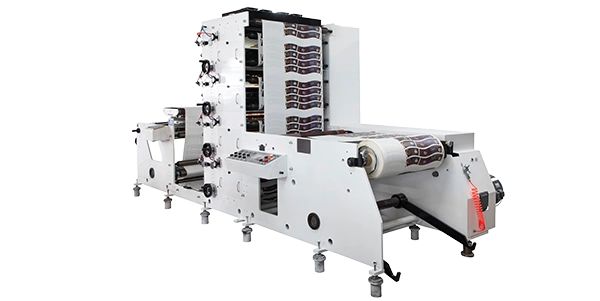
Stack Flexo Printing Machines
-
Key feature: Cost-effective stack presses with independent unit operation
-
Performance: ±0.1mm registration accuracy at speeds up to 120m/min
-
Color options: 1-9 colors
-
Web widths: 320- 1250 mm
-
Best for: Paper cups, burger wrappers, and self-adhesive labels
-
Key technologies: 360° register adjustment, individual unit disengagement, ceramic anilox roller
Advantages and Limitations of Flexo Printing
Advantages
-
Substrate versatility: Prints on virtually any material—porous or non-porous
-
High-speed production: CI flexo presses can operate at speeds up to 500m/min
-
Cost-effective for volume: Economical for medium to long production runs
-
Wide ink compatibility: Works with water-based, solvent-based, UV-curable inks
-
Integration capability: Can be combined with inline converting (die-cutting, slitting)
Limitations
-
Setup time: Initial setup is time-consuming as plates, inks, and press parameters must be carefully configured
-
Not ideal for very short runs: Setup costs make short runs less economical
-
Resolution limits: Traditional flexo resolution (up to ~180 LPI) is lower than offset
Real-World Application Scenario
A flexible packaging converter expanding into food packaging
A converter currently printing labels decides to expand into flexible food packaging. The operation needs to print on BOPP and PET films with 6-8 colors.
Key considerations for press selection:
-
Substrate: Thin, stretch-sensitive films require a CI (Central Impression) flexo press for ±0.075mm registration accuracy
-
Ink system: UV-curable inks for non-absorbent film substrates; press must be equipped with UV curing units
-
Drying: For water-based inks on paper, the press requires adequate drying capacity; CI presses feature a 5m energy-efficient oven with secondary hot air recirculation
-
Quality control: Video inspection systems for real-time print quality monitoring
For an overview of press configurations that support different packaging applications, explore the flexo printing machine series.
Next Steps – From Understanding to Equipment Selection
By now, you should have a solid understanding of what a flexo printing machine is and how it works:
-
Flexo is a rotary relief printing process that uses flexible plates to transfer ink directly to a substrate
-
The process involves prepress (plate making) and printing (anilox inking → plate transfer → impression → drying → repeat)
-
Key components include the anilox roller, doctor blade system, plate cylinder, impression cylinder, and drying system
-
Flexo dominates packaging because of its substrate versatility, speed, and cost-effectiveness
-
The anilox roller is the heart of quality—its cell structure determines ink film thickness and print consistency
The next logical step is moving from understanding the technology to evaluating specific equipment. Key questions to ask when considering a flexo printing machine:
-
What substrates will you print on? This determines whether you need a CI, stack, or inline press architecture.
-
What is your typical run length? CI presses are ideal for mass production of flexible film; inline presses are perfect for frequent small to medium batch orders
-
What ink types will you use? This determines drying/curing system requirements.
-
Do you need inline finishing? Die-cutting or slitting may require an inline press configuration
-
What quality standards do you need to meet? Consider registration accuracy requirements—CI presses offer ±0.075mm for high-precision applications
Review the flexo printing machine series to compare configurations across CI, stack, and inline architectures. For project‑specific technical consultation regarding press selection and application requirements, contact our service and support team to receive substrate‑specific guidance and professional feasibility assessments.
Related Reading
-
CI vs Stack vs Inline Flexo Presses: Which Fits Your Production Line?
-
How to Choose the Right Flexo Press for Food Packaging Applications
-
Substrate Selection Guide for Flexographic Printing
-
Understanding Anilox Roller Selection for Quality Flexo Printing
-
Flexo Printing Inks: Water-Based vs UV vs Solvent